
CancellationToken in ASP.NET Core: Essential
End-to-End Propagation, Client-Side Timeouts & Real-World Implementation
If you have wired CancellationToken only at the controller level, you are still leaking resources the moment the request leaves that layer. This article shows exactly how to propagate it end‑to‑end — from browser to database.
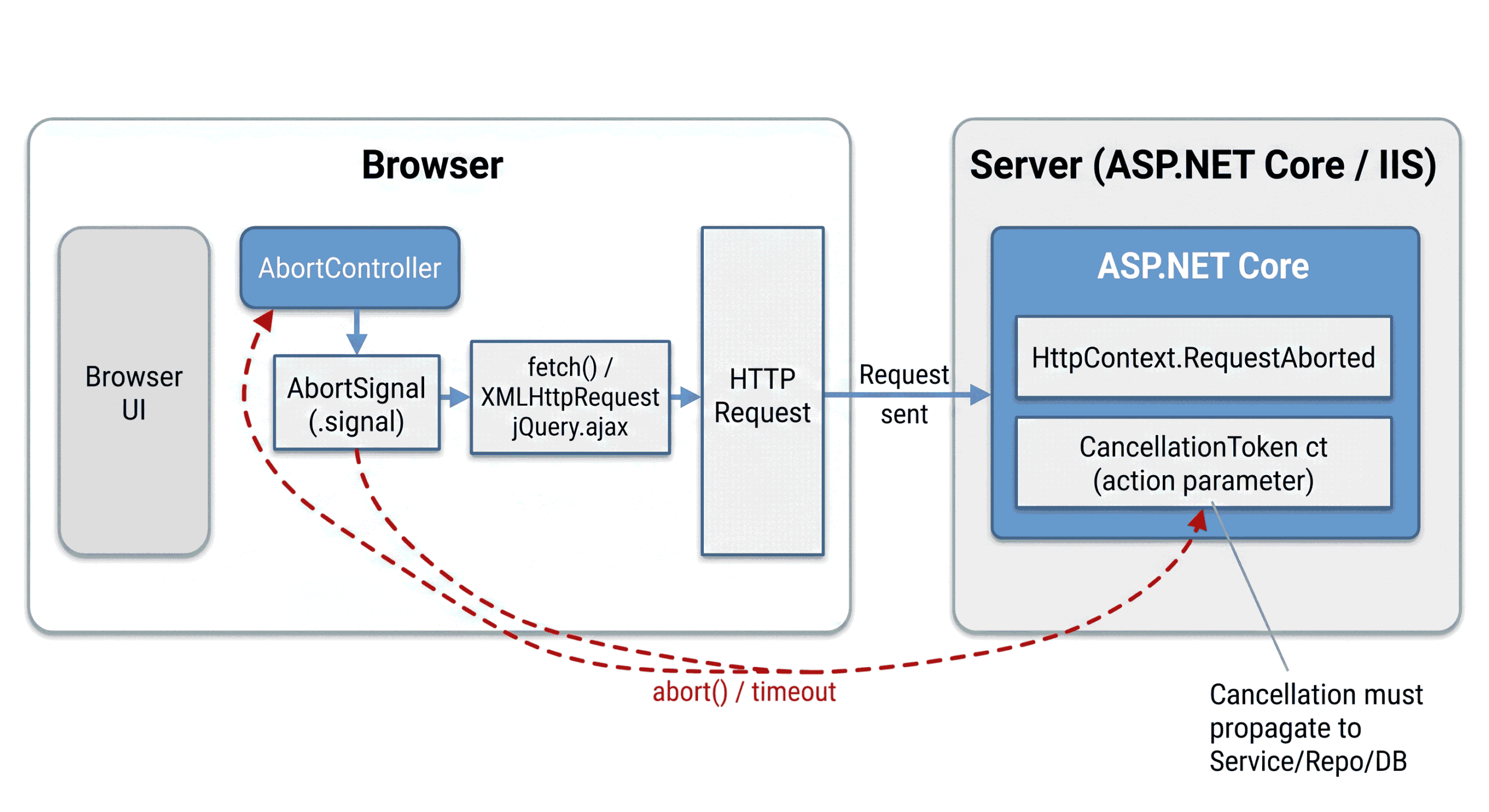
Time for deep‑dive 🔍, action on 👊, and straight to real code 💻
Welcome to the second article in the
CancellationToken in
ASP.NET Core
series.
In Previous article we understood the thread-jumping reality, why ignoring CancellationToken silently wastes memory and connections, and why static classes can destroy your app’s behavior under load.
Now in this article we move from “why” to “how”. You will learn how client-side cancellation reaches your server, how to pass the token cleanly through every layer, practical implementation patterns that actually work at scale, and real-world use cases that deliver measurable gains.
If you haven’t read Previous article yet, start there to grasp the fundamentals and the thread-jumping reality before diving into propagation.
1. Introduction
Most teams think they have solved cancellation the moment they
discover HttpContext.RequestAborted. They add it in the
controller, maybe even pass it to one service call, and then move on. On
paper, that feels correct—because the request is “owned” by the
controller, so cancellation “belongs” there too. In real systems, that
assumption is exactly where the resource leak begins.
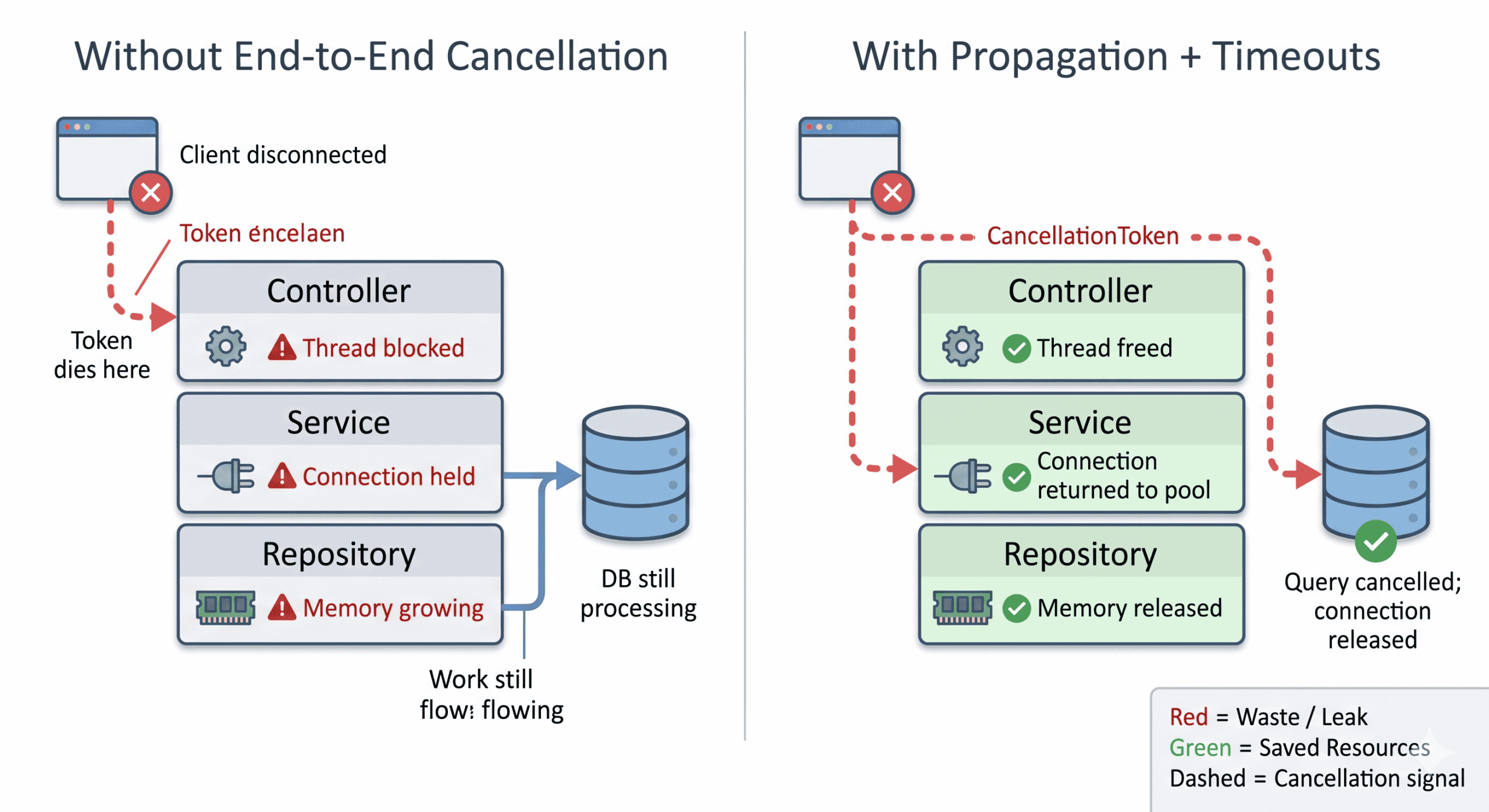
Here is the uncomfortable reality: the request does not stop being expensive just because the controller returns. Once you cross the controller boundary, your request typically fans out into a small chain of work—service orchestration, repository queries, external HTTP calls, serialization, caching, streaming, retries, and sometimes background operations triggered as side-effects. If cancellation dies at the controller boundary (because we haven’t passed the token downstream and/or managed it properly), everything downstream continues running to completion, even if the client has already disconnected.
Previous article showed why ignoring cancellation is dangerous. In this article, we close the gap completely – providing the end‑to‑end wiring that turns cancellation into a reliable, resource‑saving pipeline.
2. Fundamentals Refreshed
Most teams don’t fail at cancellation because they don’t know the names. They fail because they treat cancellation as a controller concern, instead of a pipeline contract. The difference sounds small, but under load it decides whether abandoned requests quietly stop—or keep burning memory, DB connections, and outbound sockets long after the user is gone.
2.1. Separate classes, separate responsibilities
In .NET, cancellation is intentionally split into two roles:
-
CancellationTokenSource(CTS) – the class that owns the cancellation action. Think of it as the Stop button on a machine. You explicitly callCancel()on it to fire the signal; without that call, nothing happens. -
CancellationToken(CT) – the lightweight signal that propagates from the source. It’s the readonly handle you pass to every operation that should respect the stop command.
This split is not ceremony. It’s what allows cancellation to scale across deep call chains without forcing thread aborts or unsafe termination.
2.2. Cancellation is cooperative (and that’s the point)
Cancellation in .NET is cooperative, not forced. That means nothing “kills” your operation automatically. Your code must observe the token. In practice, you do that in two ways:
-
Pass the token into cancellable APIs — whether asynchronous (database
calls, HttpClient, stream I/O) or synchronous (some file operations,
ADO.NET commands with
CancellationTokenoverloads). - Manually check the token in long loops or CPU-heavy work.
Note:
CancellationTokenis not limited to asynchronous methods. Many synchronous APIs also accept and respect a token. The propagation patterns in this article apply equally to async and synchronous code.
public async Task DoWorkAsync(CancellationToken ct)
{
    ct.ThrowIfCancellationRequested();
    await Task.Delay(TimeSpan.FromSeconds(1), ct).ConfigureAwait(false);
}// end of DoWorkAsync method.
2.3. Timeouts are just “scheduled cancellation”
In production systems, a “timeout” should not be a separate mechanism. It
should be expressed as cancellation. That’s exactly what
CancelAfter(...) does.
2.4. Linked tokens: request cancellation + business deadline
The clean way to combine multiple cancellation reasons is a linked CTS:
public async Task<TResult> ExecuteWithBusinessTimeoutAsync<TResult>(
    Func<CancellationToken, Task<TResult>> action,
    TimeSpan timeout,
    CancellationToken requestToken)
{
    CancellationTokenSource linkedCts = CancellationTokenSource.CreateLinkedTokenSource(requestToken);

    try
    {
        linkedCts.CancelAfter(timeout);
        TResult result = await action(linkedCts.Token).ConfigureAwait(false);
        return result;
    }
    finally
    {
        linkedCts.Dispose();
    }
}// end of ExecuteWithBusinessTimeoutAsync function.
2.5. The “silent leak” most teams miss: CTS disposal
CTS is IDisposable. If you create linked sources per request
and don’t dispose them, you invite slow memory pressure. Disposing does
not cancel work; it releases resources. Always follow
create → try → finally → dispose.
Fresh analogy: Think of the token as a fire alarm sound and CTS as the control panel. Triggering the alarm is easy. But unless every room hears it and evacuates (every layer observes/passes the token), the building still burns—just more quietly.
3. The Client-Side Cancellation Reality
In real production traffic, clients don’t behave politely. Users close tabs, navigate away, type a new search term, or lose network mid-request. From the browser’s perspective, cancelling a request is normal. From the server’s perspective, it’s either a gift (if you stop work) or a silent tax (if you keep working for a user who is already gone).
3.1. How AbortController and AbortSignal work
Modern JavaScript finally gives us a clean cancellation primitive:
AbortController. The important part isn’t the controller itself—it’s the
signal. Think of AbortController.signal as a broadcast “stop”
channel that you pass into request APIs. When someone triggers
cancellation (user action or a timeout), the signal transitions to
aborted, and APIs like fetch reject the promise with an
AbortError. That failure isn’t “an error” in the usual
sense—it’s a control-flow outcome:
the request was intentionally stopped.
Here is the pattern that actually survives in production: one controller, one timer, cleanup always.
const controller = new AbortController();
const signal = controller.signal;

const timeoutId = setTimeout(() => controller.abort(), 10_000);

fetch("/api/search", { method: "POST", signal: signal })
  .catch((err) => {
    if (err.name === "AbortError") {
      console.log("Cancelled (user or timeout)");
      return;
    }
    throw err;
  })
  .finally(() => clearTimeout(timeoutId));
3.2. Legacy XMLHttpRequest bridge
Now comes the enterprise reality: not every frontend is pure
fetch. Many systems still have legacy modules built on
XMLHttpRequest (or jQuery). XHR does not
accept an AbortSignal, but it can be cancelled via
xhr.abort(). So you simulate AbortController-style
cancellation by
bridging the signal to xhr.abort() and
cleaning up the listener.
function sendXhrWithSignal(url, body, signal)
{
  return new Promise((resolve, reject) =>
  {
    const xhr = new XMLHttpRequest();
    xhr.open("POST", url, true);

    function onAbort()
    {
      xhr.abort();
    }

    if (signal)
    {
      // incase signal is already aborted.
      if (signal.aborted)
      {
        onAbort();
      }
      else
      {
        signal.addEventListener("abort", onAbort, { once: true });
      }// end of if/else of if (signal.aborted)

    }// end of if (signal)

    xhr.onload = () => resolve(xhr.responseText);
    xhr.onabort = () => reject(new DOMException("Aborted", "AbortError"));
    xhr.onloadend = () =>
    {
      if (signal) signal.removeEventListener("abort", onAbort);
    };

    xhr.setRequestHeader("Content-Type", "application/json");
    xhr.send(body);
  }); // end of return new Promise((resolve, reject)
}// end of function sendXhrWithSignal
3.3. Why jQuery is still relevant in cancellation discussions (jQuery Cancellation Examples (Practical, Production-Oriented)).
Even in modern enterprise codebases, you still find:
- legacy screens using
$.ajax() - shared “API client” modules built around jqXHR
- search-as-you-type UIs implemented years ago
The key point:
$.ajax() returns a jqXHR object, and that object exposes an
.abort() method to cancel the in-flight
request.
Also, $.ajax() supports a
timeout option (milliseconds) which triggers
failure outcomes like "timeout" or
"abort" in callbacks.[1]
3.3.1. Example 1 — Search-as-you-type: cancel the previous request immediately
This is the most common real-world pattern. When the user types again, the
previous request is now stale, so you abort it. The variable
activeRequest holds the current jqXHR.
jqXHR.abort() cancels it.[1]
let activeRequest = null;
let debounceId = null;

function searchProducts(query)
{
  // Abort previous request if it is still running
  if (activeRequest)
  {
    activeRequest.abort(); // jqXHR.abort()
    activeRequest = null;
  } // end of if (activeRequest)

  // Start a new request
  activeRequest = $.ajax({
    url: "/api/search",
    method: "POST",
    data: JSON.stringify({ query: query }),
    contentType: "application/json",
    timeout: 10_000, // jQuery timeout in ms

    success: function (data)
    {
      console.log("Search results:", data);
    },

    error: function (jqXHR, textStatus, errorThrown)
    {
      if (textStatus === "abort")
      {
        return;
      }
      if (textStatus === "timeout")
      {
        console.warn("Search timed out");
        return;
      }
      console.error("Search error:", textStatus, errorThrown);
    }, // end of error

    complete: function (jqXHR, textStatus)
    {
      if (activeRequest === jqXHR)
      {
        activeRequest = null;
      }
    } // end of complete

  }); // end of activeRequest = $.ajax({

  return activeRequest;
} // end of searchProducts

function wrapperSearchProduction(query)
{
  // Skip if query is empty
  if (!query)
  {
    if (activeRequest)
    {
      activeRequest.abort();
      activeRequest = null;
    }
    return;
  } // end of if (!query)

  searchProducts(query);
} // end of wrapperSearchProduction

// Debounced key handler (prevents firing on every keystroke)
$("#searchBox").on("input", function ()
{
  const query = $(this).val();
  clearTimeout(debounceId);
  debounceId = setTimeout(() => wrapperSearchProduction(query), 250);
});
Why this matters: Your UI stays responsive. You stop wasting client-side bandwidth and reduce stale result rendering. But remember the bigger architecture point: client abort does not automatically stop server work unless the backend propagates cancellation end-to-end.
3.3.2. Example 2 — Cancel button + request lifecycle
For long-running operations (reports, exports), it’s common to give users a “Cancel” button.
let reportRequest = null;

function startReport()
{
  // Start report generation
  reportRequest = $.ajax({
    url: "/api/report",
    method: "POST",
    contentType: "application/json",
    data: JSON.stringify({ format: "pdf" }),
    timeout: 60_000,

    success: function (data)
    {
      console.log("Report ready:", data);
    }, // end of success

    error: function (jqXHR, textStatus)
    {
      if (textStatus === "abort")
      {
        console.log("Report request cancelled by user");
        return;
      }
      console.error("Report error:", textStatus);
    }, // end of error

    complete: function ()
    {
      reportRequest = null;
    } // end of complete

  }); // end of reportRequest = $.ajax({
} // end of startReport

function cancelReport()
{
  if (reportRequest)
  {
    reportRequest.abort(); // jqXHR.abort()
    reportRequest = null;
  } // end of if (reportRequest)
} // end of cancelReport

$("#btnStart").on("click", startReport);
$("#btnCancel").on("click", cancelReport);
3.3.3. Example 3 — Bridge AbortController to jQuery (modern cancellation API, legacy transport)
jQuery doesn’t take an AbortSignal directly, but you
can wire an AbortController to call
jqXHR.abort() when the signal fires. The
abort() method exists on jqXHR.[1]
function ajaxWithAbortController(options)
{
  const controller = new AbortController();
  const signal = controller.signal;

  const timeoutMs = options.timeoutMs || 10_000;
  const timeoutId = setTimeout(() => controller.abort(), timeoutMs);

  const jqxhr = $.ajax({
    url: options.url,
    method: options.method || "GET",
    data: options.data,
    contentType: options.contentType,
    timeout: timeoutMs,

    complete: function ()
    {
      clearTimeout(timeoutId);
    } // end of complete

  }); // end of jqxhr = $.ajax({

  function onAbort()
  {
    jqxhr.abort(); // jqXHR.abort()
  } // end of onAbort

  if (signal.aborted)
  {
    onAbort();
  }
  else
  {
    signal.addEventListener("abort", onAbort, { once: true });
  } // end of if (signal.aborted)

  // Cleanup listener after completion
  jqxhr.always(function ()
  {
    signal.removeEventListener("abort", onAbort);
  }); // end of jqxhr.always

  return { jqxhr, controller };
} // end of ajaxWithAbortController

// Usage
const request = ajaxWithAbortController({
  url: "/api/search",
  method: "POST",
  contentType: "application/json",
  data: JSON.stringify({ query: "asp.net core" }),
  timeoutMs: 8_000,
});

// Later (user action)
request.controller.abort();
This gives you a clean modern “cancel handle” while still using jQuery behind the scenes.
3.3.4. Bonus: Cancel before sending (edge pattern)
jQuery also supports canceling a request in beforeSend by
returning false.
This is useful for validation gating (e.g., do not send if query is too
short).[1]
$.ajax({
  url: "/api/search",
  method: "POST",
  beforeSend: function (jqXHR, settings) {
    const query = $("#searchBox").val();
    if (!query || query.length < 2) {
      return false; // cancels request
    }
  },
});
Fresh analogy: client cancellation is like a customer walking away from a checkout line. If your system still processes the full invoice, reserves stock, and calls the payment gateway, you didn’t “handle cancellation”—you just stopped showing the spinner.
4. End-to-End Propagation Patterns
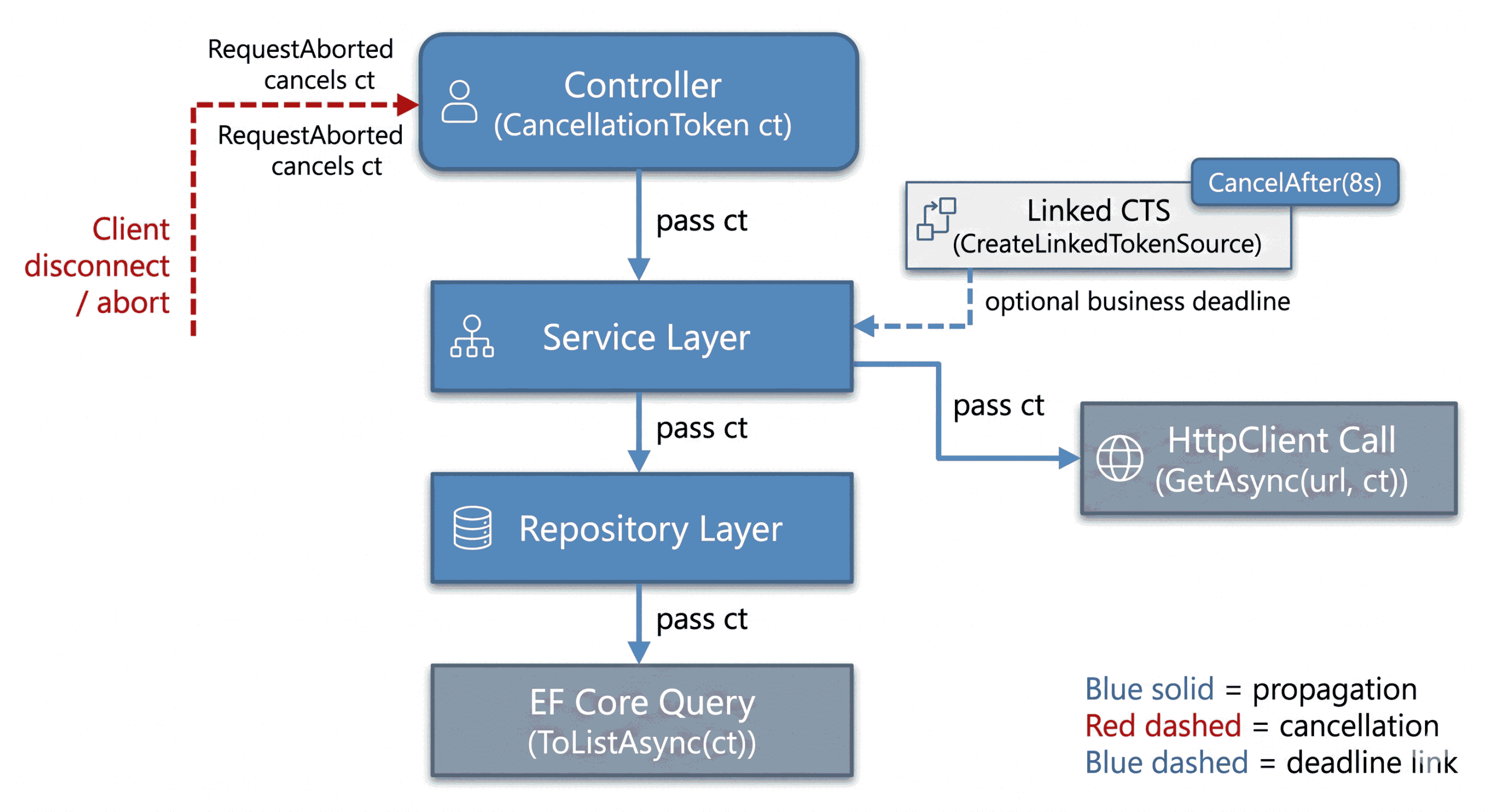
The token must travel from controller all the way to the deepest layer. Break the chain and cancellation fails.
4.1. Single Token Chain
Controller receives the request token and forwards it directly to every downstream method. This is the default and most common pattern.
4.2. Linked Token with Business Deadline
You combine the incoming request token with a business-level timeout using
a linked CancellationTokenSource. This allows both client
cancellation and your SLA timeout to work together.
4.3. Fan-out Parallel Work
When your operation makes multiple parallel calls (e.g., database query + external HTTP call), you share the same token across all branches so that cancellation affects the entire operation.
Fresh analogy: Imagine a busy highway with smart traffic lights at every intersection (Controller → Service → Repository). When an accident happens ahead (cancellation requested), the first light turns red and signals the next one. If any light stays green because it never received the message, cars keep piling up and chaos spreads. Proper token propagation ensures every light turns red together and traffic stops safely.
See Section 5 for the full production-ready code implementation of these patterns with complete try/finally disposal and error handling.
Architect’s Summary (Quick Checklist)
Use this summary block directly in your blog — it reinforces the three propagation patterns clearly.
🔹 1. Always propagate the same token (Controller → Service → Repository)
-
The controller receives the request token (
CancellationToken ct = default). -
Every method that performs meaningful work
accepts a
CancellationToken. - Every caller forwards the same token.
- Every I/O operation (EF Core, HttpClient, files, channels) uses that token.
- Never let the token “die” at the controller boundary.
🔹 2. Add business timeouts safely (use a linked CTS)
- Do NOT create a brand-new CTS that ignores the incoming token.
-
Use
CancellationTokenSource.CreateLinkedTokenSource(ct)to preserve upstream cancellation. - Apply
CancelAfter(...)for business SLAs. - Always dispose the linked CTS (
linkedCts.Dispose()).
🔹 3. When fanning out (parallel DB + HTTP), pass the token everywhere
- One linked token should control all parallel tasks.
- If the client disconnects, all fan-out tasks cancel.
- If the business timeout fires, tasks cancel immediately.
-
Use
Task.WhenAll(...)so cancellation short-circuits the whole operation.
🔹 4. Don’t create new tokens “just because”
- Creating unnecessary CTS instances hides upstream cancellation.
- Only create CTS for additional control: business deadline, retry orchestration, or parallel coordination.
- Never return a fresh, unrelated token downstream.
🔹 5. Token propagation is a pipeline contract, not a parameter
This must become part of your system-wide thinking:
“If the request was canceled, every downstream operation must also stop.”
🔹 6. The cost of dropping the token is real
If cancellation dies in any layer:
- database queries continue
- HttpClient calls continue
- streaming loops keep sending data
- CPU loops continue processing
- memory usage rises for results nobody will ever read
This is the silent resource leak that destroys scalability.
5. Implementation Guide: Layer by Layer
In Section 4 we discussed the three main propagation patterns. Here we will see the full production‑ready implementation that brings those patterns to life — with explicit types, proper linked token handling, disposal, and error handling.
- The example uses Pattern 1 (Single Token Chain) as its foundation.
- In the service layer, it applies Pattern 2 (Linked Token with Business Deadline).
- If you extend it with multiple parallel tasks, it supports Pattern 3 (Fan‑out Parallel Work).
5.1 Controller layer (Pattern 1 – see Section 4.1)
The controller receives the request cancellation token via
CancellationToken ct = default and forwards it to the
service. This is the simplest, most widespread pattern.
// Controller - Pattern 1: Single Token Chain
[HttpPost("search")]
public async Task<IActionResult> Search(string query, CancellationToken ct = default)
{
    SearchResult result = await _searchService.SearchAsync(query, ct);
    return Ok(result);

}// end of Search
5.2 Service layer (Pattern 2 – see Section 4.2)
The service takes the request token, links a business timeout, and passes the resulting token to the repository. It also demonstrates proper disposal of the linked source.
// Service Layer - Pattern 2: Linked Token with Business Deadline
public async Task<SearchResult> SearchAsync(string query, CancellationToken ct)
{
    // Fail fast if already cancelled
    ct.ThrowIfCancellationRequested();

    // Link request token with business timeout (Pattern 2)
    CancellationTokenSource linkedCts = CancellationTokenSource.CreateLinkedTokenSource(ct);
    linkedCts.CancelAfter(TimeSpan.FromSeconds(15)); // Business SLA

    try
    {
        // Pass the linked token downstream
        return await _repository.GetResultsAsync(query, linkedCts.Token)
                                .ConfigureAwait(false);
    }// end of try
    finally
    {
        // Always dispose to prevent memory leaks - critical at scale
        linkedCts.Dispose();
    }// end of try/finally

}// end of SearchAsync
5.3 Repository layer (Pattern 1 continued – see Section 4.1)
The token reaches its final destination: ToListAsync(ct). EF
Core will cancel the underlying SQL command if the token fires.
// Repository Layer - Token passed to EF Core
public async Task<SearchResult> GetResultsAsync(string query, CancellationToken ct)
{
    List<Product> products = await _dbContext.Products
        .Where(p => p.Name.Contains(query))
        .ToListAsync(ct)                    // EF Core respects the token
        .ConfigureAwait(false);

    return new SearchResult(products);
}// end of GetResultsAsync
5.4 Extending to Pattern 3 – Fan‑out parallel work (see Section 4.3)
To fan out the same token across multiple calls (database + external API),
share the linked token with all tasks. If cancellation fires,
Task.WhenAll short‑circuits the entire operation.
// Inside SearchAsync method after creating linkedCts
Task<List<Product>> dbTask = _repository.GetResultsAsync(query, linkedCts.Token);
Task<PartnerOffers> offersTask = _partnerClient.GetOffersAsync(query, linkedCts.Token);

await Task.WhenAll(dbTask, offersTask).ConfigureAwait(false);
This implementation ensures that if the client cancels or the business timeout fires, all layers stop together cleanly and resources are released properly.
6. Real-World Use Cases Deep Dive
Cancellation only feels “optional” when you’re looking at a happy‑path demo. In real systems, cancellation is what protects your infrastructure from work that no longer matters. It does this by safeguarding:
- Connection resources (IIS connections, network sockets, database connection pools)
- Memory allocations
- Downstream dependencies
Below are the three places where proper propagation delivers immediate, measurable gains.
6.1. Search APIs (the “abandoned work factory”)
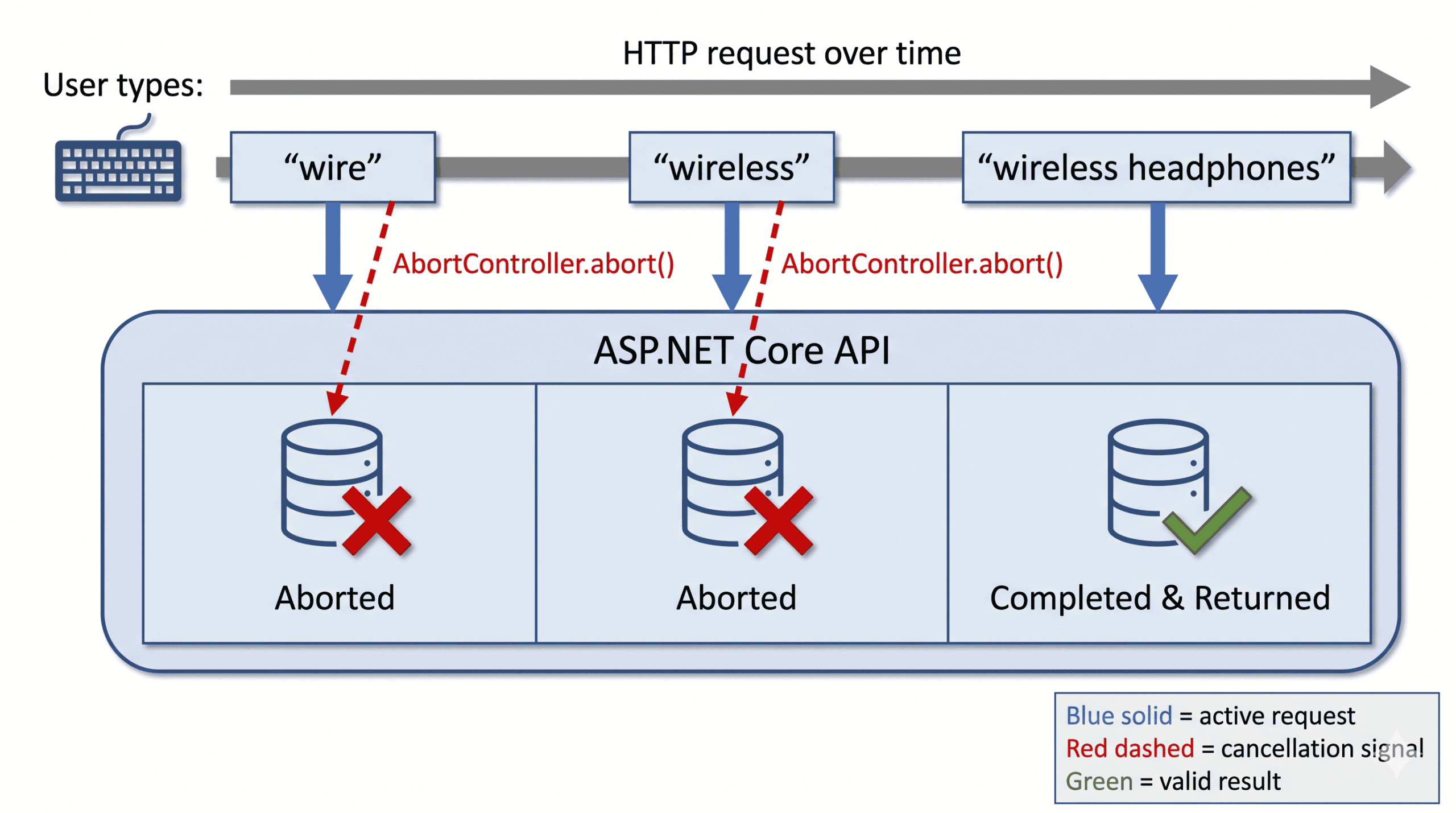
Search-as-you-type is the perfect stress test for cancellation. A user
types: wirel… wireless… wireless headphones… and each new
keystroke makes the previous request stale. If your backend keeps
executing every query to completion, your database does work for results
nobody will ever see. Under load, that stale work stacks up as:
- long-running DB queries holding connections
- memory allocations for materialized results
- CPU spent shaping and serializing payloads that will be discarded
When cancellation is propagated end-to-end, the moment the client aborts, your server can stop the query early, release the connection faster, and shift capacity to active users. The UX benefit is obvious, but the bigger win is operational: fewer “mystery” spikes in DB utilization during traffic bursts.
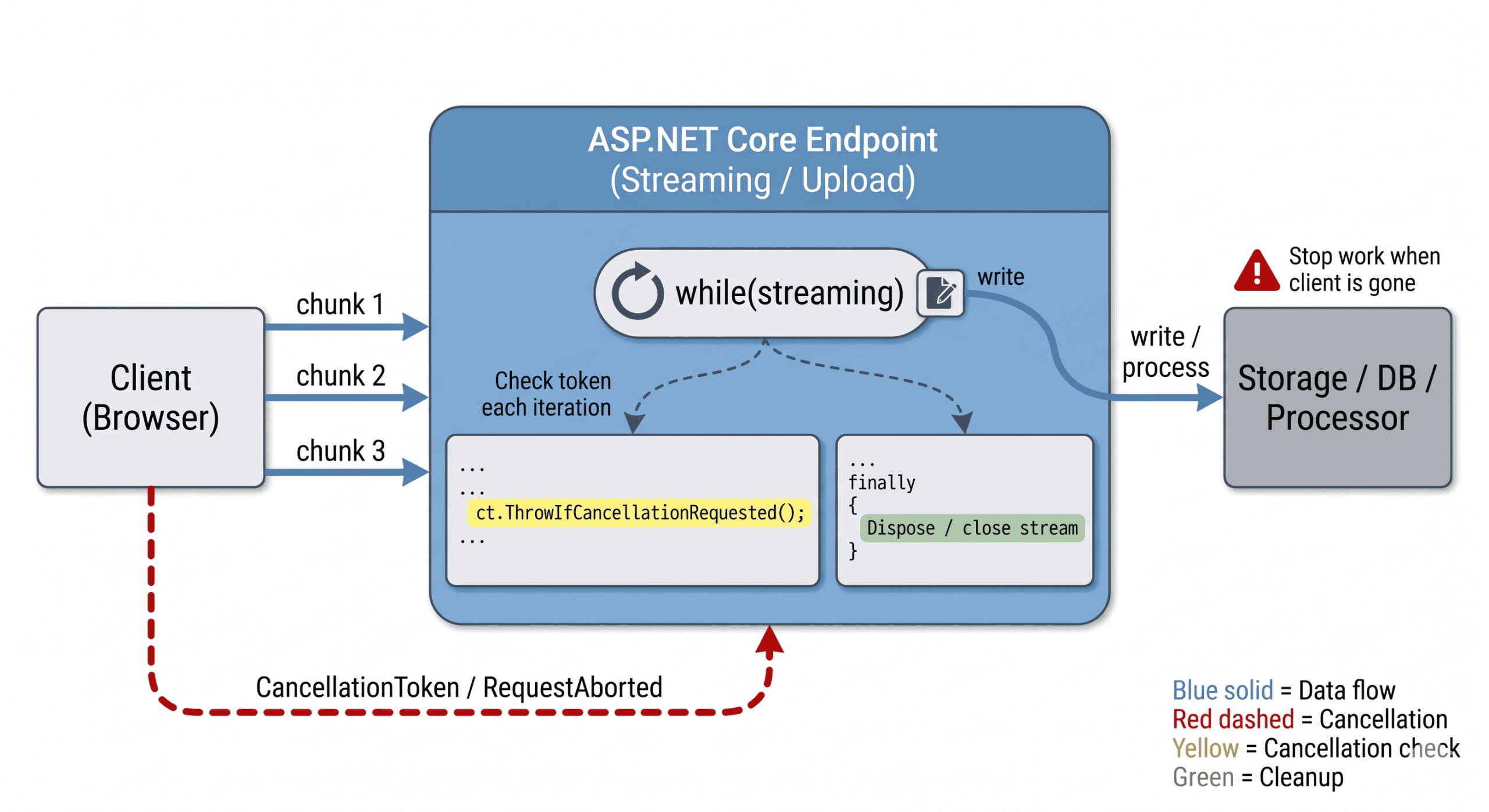
6.2. Streaming responses and file uploads (where loops never end unless you stop them)
Streaming endpoints and uploads are where “controller-only cancellation” quietly burns you. A download stream can keep producing chunks even after the user closes the tab. An upload handler can keep reading from a stream that will never complete. In both cases, the most dangerous scenario isn’t an exception — it’s a loop that keeps running “normally” while the client is gone.
This is where you must treat cancellation as part of the loop contract:
- check the token inside the streaming loop
- exit early when cancellation is requested
-
cleanup in
finallyso resources close even during cancellation
Fresh analogy: streaming without cancellation is like continuing to pump water into a broken pipeline because the pump never checks the pressure gauge. The pipe is gone, but the motor keeps running and your power bill climbs.
6.3. Background jobs and graceful shutdown (deployments, scaling, and “stuck workers”)
Hosted services and background workers are notorious for “it won’t stop during deployments.” The real reason is almost always the same: shutdown requests don’t propagate into the work loop, or long-running operations never observe a token.
If cancellation is wired properly, you get predictable behavior during:
- rolling deployments
- scale-in events
- app restarts
- failovers
Instead of leaving half-finished operations and dangling tasks, the worker sees cancellation, stops cleanly, and releases resources quickly. That’s the difference between a system that scales smoothly and one that accumulates invisible operational debt.
7. Best Practices for Robust Cancellation
Cancellation becomes reliable in production when you treat it as a pipeline contract, not a “controller feature.” The goal is simple: when the request is no longer needed, every expensive operation must stop quickly and cleanly.
7.1. Practical rules that actually prevent wasted work
-
Forward the token everywhere
Every method that performs meaningful work should accept aCancellationToken ctand pass it downstream. One missed hop is where cancellation silently dies. -
Fail fast + check inside long paths
Callct.ThrowIfCancellationRequested()at method boundaries and inside loops/batch processors. CPU work won’t stop unless you check. -
Pass the token to I/O APIs
EF Core queries, database queries, HttpClient calls, stream reads/writes—these are where resources are held. If you don’t pass the token, cancellation can’t release resources early. -
Use linked CTS only when adding control (timeouts), and always dispose
Create a linked CTS for business deadlines, but never replace the incoming token. AlwaysDispose()the CTS infinally. -
Don’t treat cancellation as an error
User navigations, timeouts, and shutdown cancellations are normal. Avoid noisy “error” logs for expected cancellation paths.
7.2. A single “production-safe” example (Controller → Service → DB + HTTP)
// Controller
[HttpPost("search")]
public async Task<IActionResult> Search(string query, CancellationToken ct = default)
{
    SearchResult result = await _searchService.SearchAsync(query, ct);
    return Ok(result);

}// end of Search

// Service
public async Task<SearchResult> SearchAsync(string query, CancellationToken ct)
{
    ct.ThrowIfCancellationRequested();

    CancellationTokenSource linkedCts = CancellationTokenSource.CreateLinkedTokenSource(ct);
    linkedCts.CancelAfter(TimeSpan.FromSeconds(8)); // business deadline

    try
    {
        Task<List<Product>> dbTask = _repository.FindProductsAsync(query, linkedCts.Token);
        Task<PartnerOffers> offersTask = _partnerClient.GetOffersAsync(query, linkedCts.Token);

        await Task.WhenAll(dbTask, offersTask).ConfigureAwait(false);

        SearchResult result = new SearchResult(dbTask.Result, offersTask.Result);
        return result;
    }// end of try
    finally
    {
        linkedCts.Dispose();
    }// end of try/finally
}// end of SearchAsync
This example shows the “real” best practice: one token controls the whole pipeline, timeouts don’t break request cancellation, and cleanup is guaranteed even when cancellation occurs.
8. Pitfalls and Anti-Patterns (Implementation Focus)
Most cancellation failures in production are not caused by missing features—they’re caused by small, silent mistakes that break the cancellation chain or hide the signal entirely. Here are the key anti‑patterns you must avoid.
8.1. Letting the token “die” at the controller boundary
The most common failure: the controller receives a valid request token,
but the service call ignores it. Once that happens, EF Core, HttpClient,
and long-running loops will continue running even after the client
disconnects. ASP.NET Core exposes the request
cancellation token through HttpContext.RequestAborted, and
action parameters bind directly to it, but it’s your responsibility to
pass it forward.[2]
8.2. Creating a fresh CTS and ignoring the incoming token
Developers often wrap service logic in a new
CancellationTokenSource “to add a timeout,” accidentally
discarding upstream cancellation. The right approach is
CreateLinkedTokenSource, which merges business deadlines with
the request token. This preserves client disconnect signals while still
enforcing your SLA.[4]
8.3. Forgetting to dispose linked CTS
CancellationTokenSource implements IDisposable,
and Microsoft explicitly recommends disposing it to free resources. Not
disposing linked CTS instances—especially in high‑throughput
endpoints—creates slow, steady memory pressure that is extremely hard to
diagnose.[5]
8.4. Not passing the token into resource‑holding I/O calls
Even if your methods accept a token, cancellation is meaningless unless
you pass it into the APIs that actually hold system resources. This
includes—but is not limited to—database queries (EF Core, Dapper, raw
ADO.NET commands), external HTTP calls
(HttpClient), file and stream I/O, and any other cancellable operation. EF
Core async queries such as ToListAsync(ct) and HttpClient
methods like GetAsync(url, ct) are common examples where
forgetting the token silently disables cancellation.[7]
8.5. Treating cancellation as an “error”
User navigations, timeouts, and shutdowns naturally trigger cancellation.
Logging these as errors causes noise, hides real failures, and misleads
operations teams. Instead, treat
OperationCanceledException as
expected control flow. Perform any necessary cleanup in
finally blocks and let the exception propagate – but never
log it as a fault.
// ANTI‑PATTERN: catches everything, logs cancellation as an error
public async Task<SearchResult> SearchAsync(string query, CancellationToken ct)
{
    try
    {
        SearchResult result = await _repository.GetResultsAsync(query, ct)
                                               .ConfigureAwait(false);
        return result;
    }// end of try
    catch (Exception ex)
    {

        _logger.LogError(ex, "Search failed."); // Cancellation ends up in the error log
        throw; // The exception is still propagated – the client sees the cancelation

    }// end of try/catch

}// end of SearchAsync

// CORRECT: cancellation flows upward; cleanup happens in finally, no error log
public async Task<SearchResult> SearchAsync(string query, CancellationToken ct)
{
    ResourceHandle handle = AcquireResource();
    try
    {
        SearchResult result = await _repository.GetResultsAsync(query, ct)
                                               .ConfigureAwait(false);
        return result;
    }// end of try
    catch (Exception ex)
    {
        // OperationCanceledException is allowed to propagate – no error log needed
        if (ex is not OperationCanceledException) _logger.LogError(ex, "Search failed."); // log only real failures
        throw;

    }// end of try/catch
    finally
    {
        handle.Dispose(); // Always runs, even when cancellation occurs
    }// end of try/finally

}// end of SearchAsync
Why this matters: In the first example, the
throw; ensures the client still receives the cancellation (so
the operation doesn’t fail silently). The problem is purely operational:
every user‑initiated cancellation raises an error log entry, polluting
telemetry and making it harder to spot real failures. The second example
eliminates that noise while still disposing of resources cleanly and
allowing the exception to reach the
ASP.NET Core infrastructure, which translates
it into an appropriate HTTP status code (e.g., 499 or 408).
Avoiding this pitfall turns cancellation into a predictable, resource‑protecting mechanism rather than a source of log confusion.
9. Beyond Basic Propagation
Once you have the core patterns in place—forwarding the token across every layer, linking business deadlines, and disposing sources safely (see Section 2 and Section 4)—cancellation becomes a system-wide control mechanism, not just a controller detail. In .NET, cancellation is cooperative—nothing stops unless your code observes the token or passes it into cancellable APIs.[9]
From here, you can combine CancellationToken with resilience
and distributed‑system libraries for even stronger pipelines:
-
Polly – Retry and circuit‑breaker policies accept a
CancellationToken. When you call.ExecuteAsync(ct), the token flows into the executed delegate, so retries stop immediately when the operation is cancelled.[10] -
System.Threading.Channels –
ChannelReader<T>.ReadAsync(CancellationToken)andWaitToReadAsync(CancellationToken)both respect cancellation, andReadAllAsync(CancellationToken)returns a cancellableIAsyncEnumerable<T>. This lets producer‑consumer pipelines shut down cleanly.[11] -
gRPC deadlines – Deadlines allow a client to specify
how long it will wait; when exceeded the call is cancelled. On the
server,
ServerCallContext.CancellationTokenfires when the request is aborted, and passing that token to async operations ensures the entire call graph stops quickly and child calls cancel together.[12]
These integrations turn cancellation from a code‑level detail into a system‑wide contract that protects resources across service boundaries.
10. Conclusion
When you step back and look at the entire cancellation story in ASP.NET Core, the lesson is clear: cancellation is not optional, it is a contract. It is a contract between the browser and the server, between the controller and the service, between the service and the repository, and ultimately between your application and its infrastructure.
Teams that implement clean token propagation consistently report tangible benefits:
- Lower memory usage because abandoned tasks are stopped early.
- Reduced latency because resources are freed up for active requests.
- Improved stability because runaway background work no longer overwhelms the system.
- Better user experience because the server responds to client intent in real time.
The key takeaway is that cancellation is not just a defensive coding practice. It is a design principle that makes your system responsive to change. In modern distributed applications, where users can cancel, navigate away, or trigger multiple concurrent requests, respecting cancellation is the difference between a system that scales and one that silently leaks.
Your call to action today:
Search for methods that don’t accept a CancellationToken.
Start forwarding the cancellation token that belongs to that scope –
HttpContext.RequestAborted,
IHostApplicationLifetime.ApplicationStopping, or your own
linked source. Every link you add seals a resource leak permanently.
In short: CancellationToken is the language of cooperation in async programming. If you ignore it, you are forcing your system to work blindly. If you propagate it, you empower your system to stop gracefully, save resources, and respect the user’s intent. That is the hallmark of a truly modern, scalable ASP.NET Core application.
References
- jQuery AJAX abort and timeout documentation
- Aborting AJAX Requests Using jQuery
- HttpContext.RequestAborted Property
- HttpContext in ASP.NET Core
- CancellationTokenSource Class
- CancellationTokenSource.Dispose Method
- Cancel async tasks after a period of time (C#)
- Asynchronous LINQ Queries – ToListAsync etc.
- Cancellation in Managed Threads
- Polly: Cancellation
- ChannelReader<T>.ReadAllAsync Method
- Deadlines and cancellation in gRPC services